

Before an AI agent can buy the right size
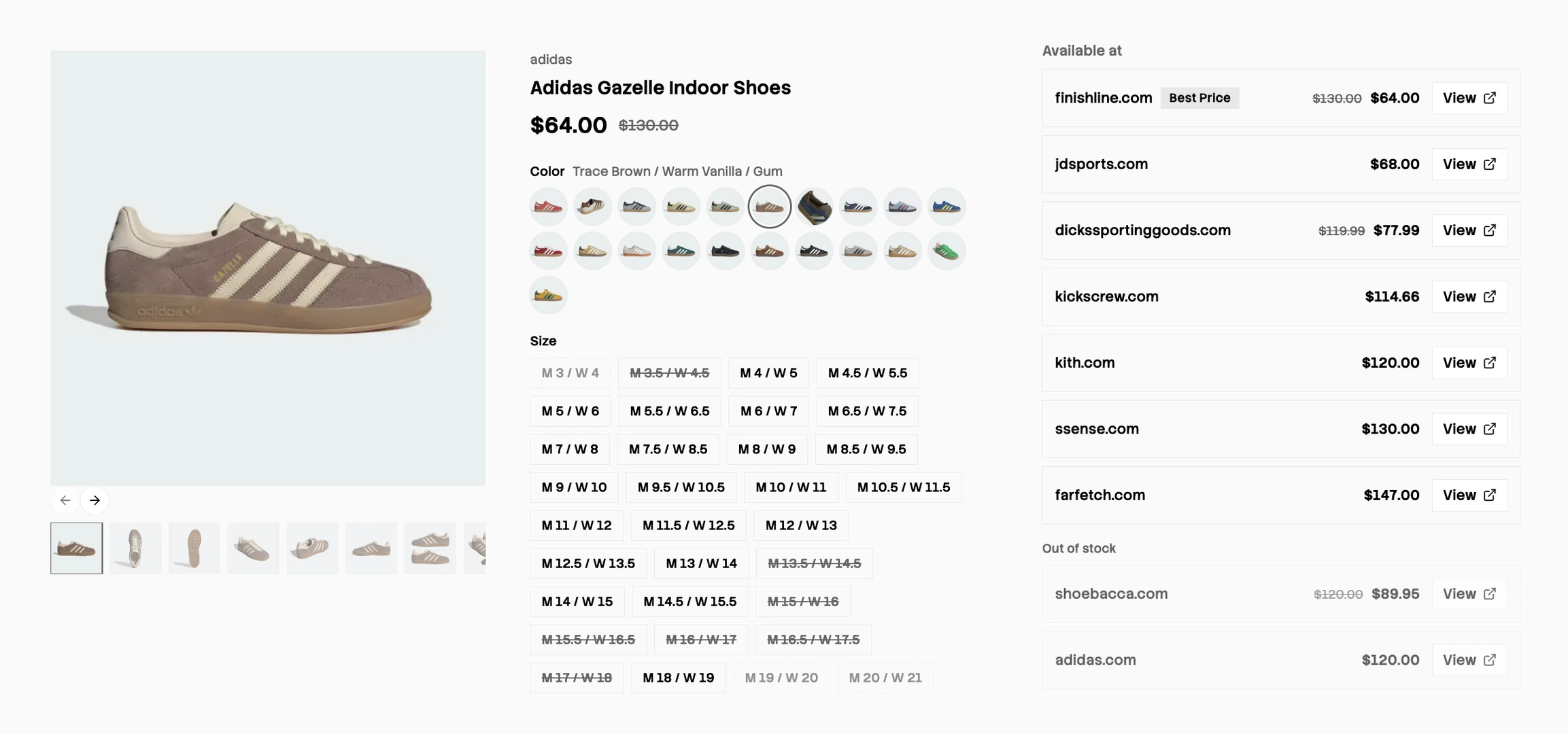
Say you want a pair of men's adidas Gazelle Indoor, in brown, in a size 10.
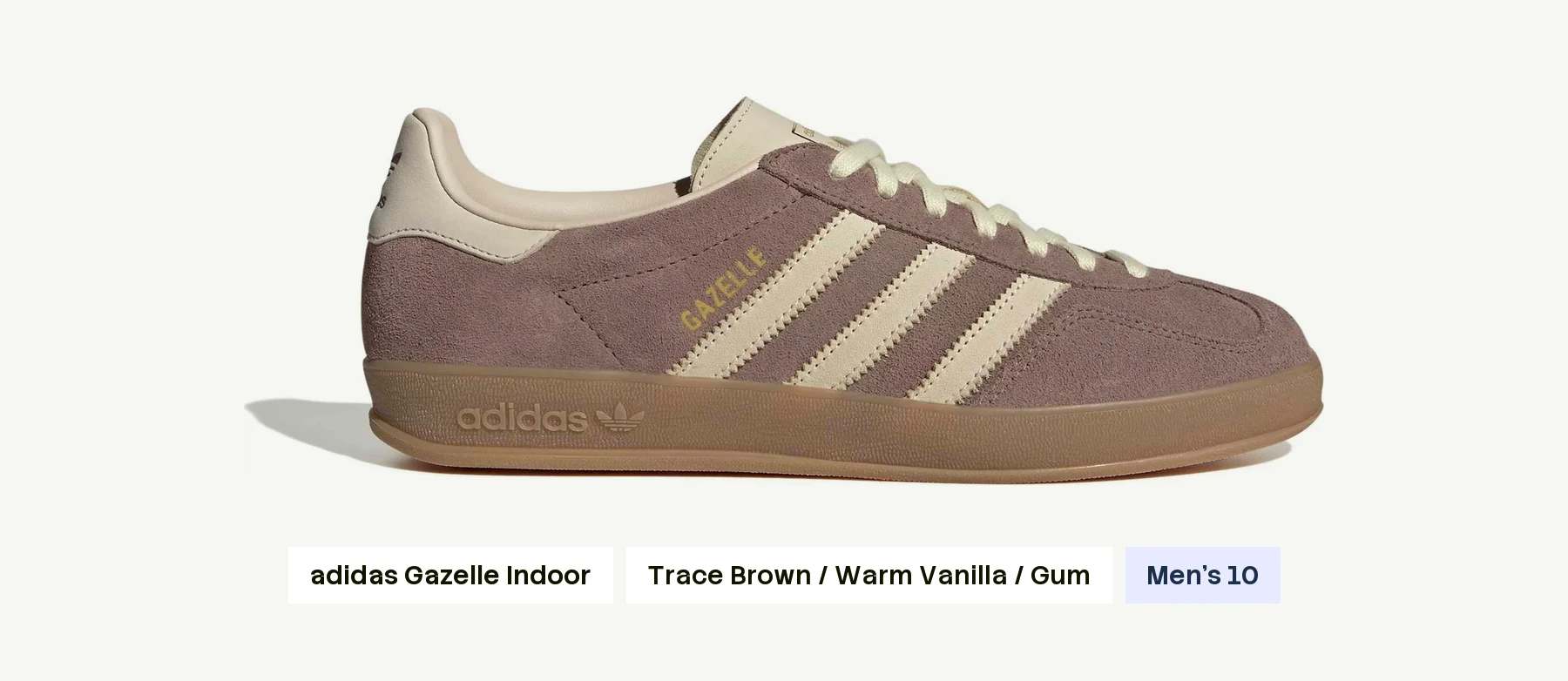
As people, we can pick from a multitude of retailers and stores, or buy online, and have the product in our hands in a day.
If you're an AI agent, it isn't as easy. The agent has to work out which stores sell the men's Gazelle Indoor, which of them carry the brown color, which have a size 10 in stock, and which is the cheapest retailer it can also trust.
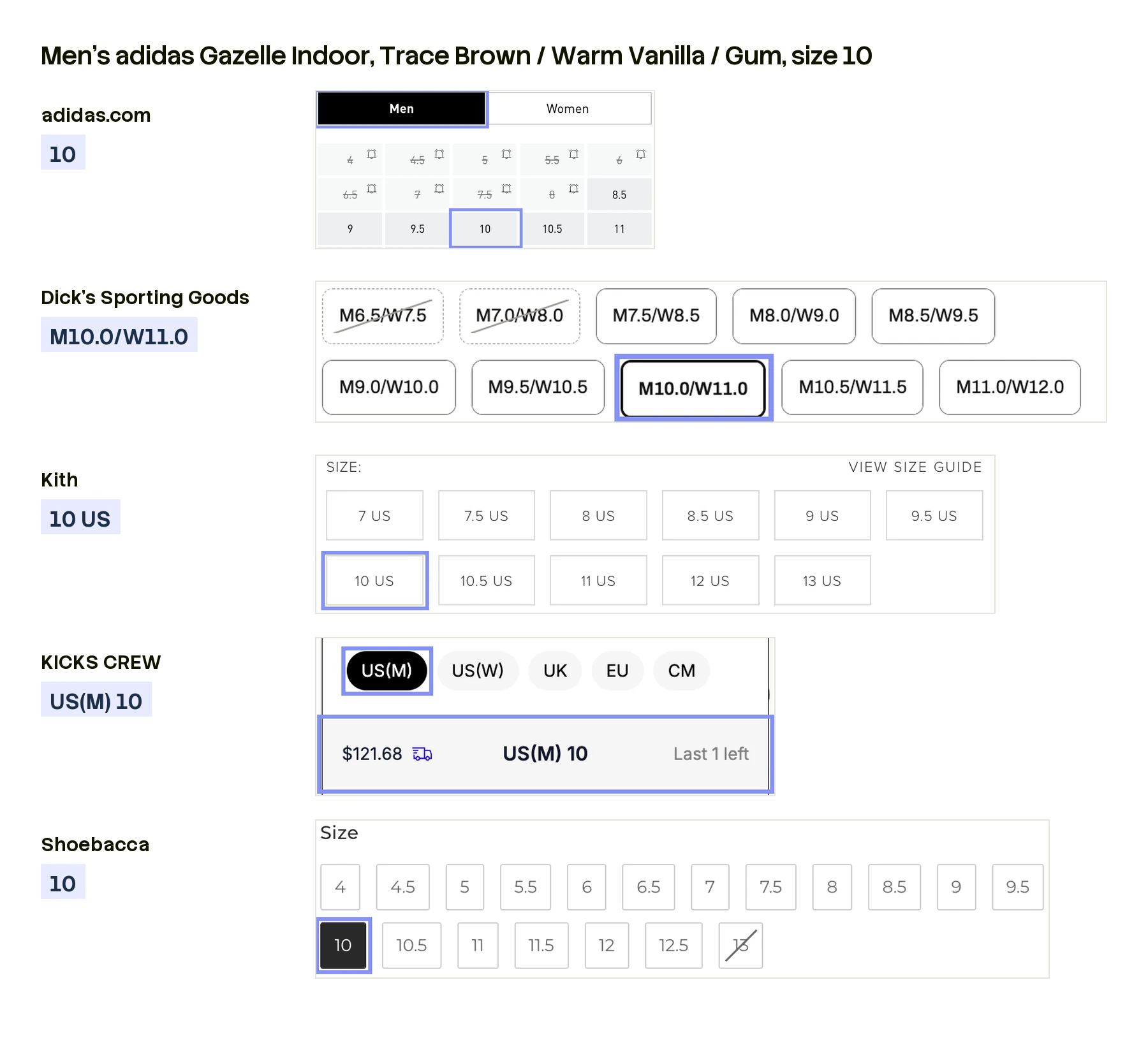
Reading any one page is easy, for a human or an agent. The hard part is that no page knows the others exist. Foot Locker's “10.0” does not know it is the same as adidas's “10”. Someone has to decide that all these buttons mean the same size of the same shoe.
That is the work we do at Channel3. Search our catalog for the Gazelle Indoor and you get one shoe, not a pile of unrelated pages, because we store products, not web pages. A product can differ in a few ways, such as color and size; we call those variants. On a page, each variant shows up as an option you pick from, like a row of size buttons, and each button is a value. Each store's page for a product is a listing.
By the end, every value has three versions: what the store wrote, what the brand wrote, and one fixed entry an agent can filter on. Ask for the Gazelle Indoor in brown, size 10, and you get every listing that sells exactly that. Four decisions get us there.
1. The category decides what counts as a variant
When are two pages the same product, and when are they two different ones?
The Gazelle Indoor in black and the Gazelle Indoor in brown are one product in two colors. The Gazelle Indoor and the Gazelle Bold are two different products. What separates them is a rule we keep for each category: a short list of what is allowed to change.
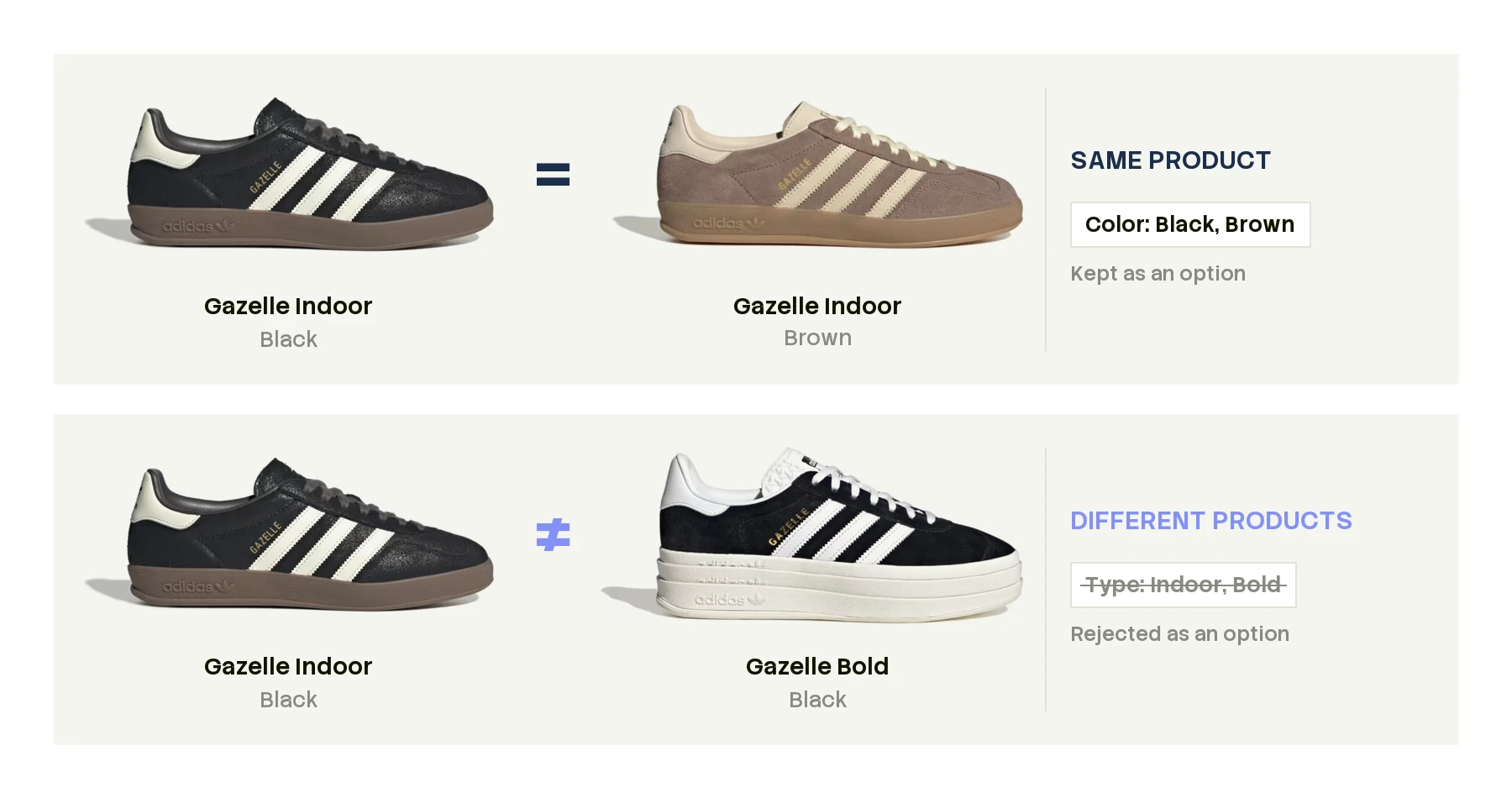
A shoe can come in different colors, sizes or materials and still be the same shoe. Give it a different shape, heel or strap, and it becomes a different shoe. That list has to be strict, because a loose one fails the other way. If a rug could change color, size, shape and pattern and still count as the same rug, nothing would separate one rug from another, and every rug in the world would become one product. So each category gets its own list:
- Phones: storage and color can change. Next year's model is a new product.
- Rings: ring size and metal can change. A different stone cut is a different ring.
- Sofas: fabric and color can change. A three-seater is a different sofa from a two-seater.
Why not take each page's word for it? Because stores don't agree on where one product ends and the next begins.
- Zara splits one product: the same pleated jeans in mid-blue and brown sit on two pages that never mention each other. We file them as one product in two colors.
- Nike groups several together: men's, women's and kids' Air Jordan 1 Mids share one page and one size option. We split them into separate products, one per fit, because a kids' 4 and a men's 4 are different shoes.
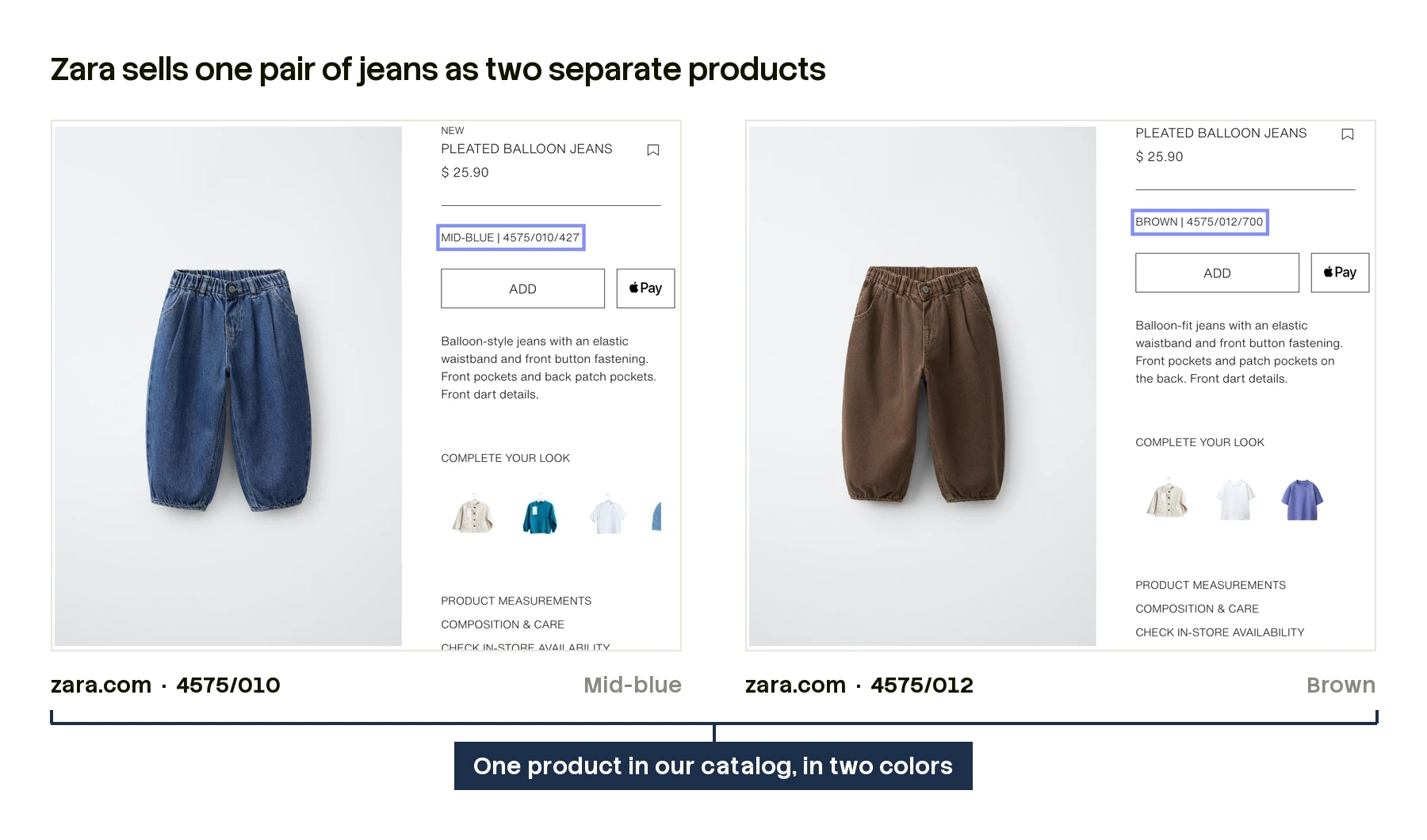
A rule per category lets us draw the line the same way everywhere.
2. Read the values, not the label
Is this one choice, or several stuck together?
Every store labels its options its own way. Some skip the label entirely and just show a row of color swatches. Others call it “Option”, which might mean size on one page and width on the next. The values get messy too: stores glue words together with slashes, plus signs and dashes. Sometimes that's two separate choices squeezed into one, and sometimes it's just a long name. The label won't tell you which, so we look at the values instead.
- A bunk bed: “Manufacturer Color/Finish: Black”. The label names two things, but the value is one color. We store one option, Color/Finish, with three values: Wood, Black, White.
- A planter: “Color / Size: Black / 72" X 15.7" X 47"”. The value holds a color and a size. We split it into two options: Color, Black, and Size, 72" X 15.7" X 47".
- A pair of scissors: “Finish: Red + White”. Two colors, but one two-tone finish. We keep it whole: one option, Finish, with four values: Cream + Forest Green, Stainless Steel + Orange, Red + White, Charcoal + Black.
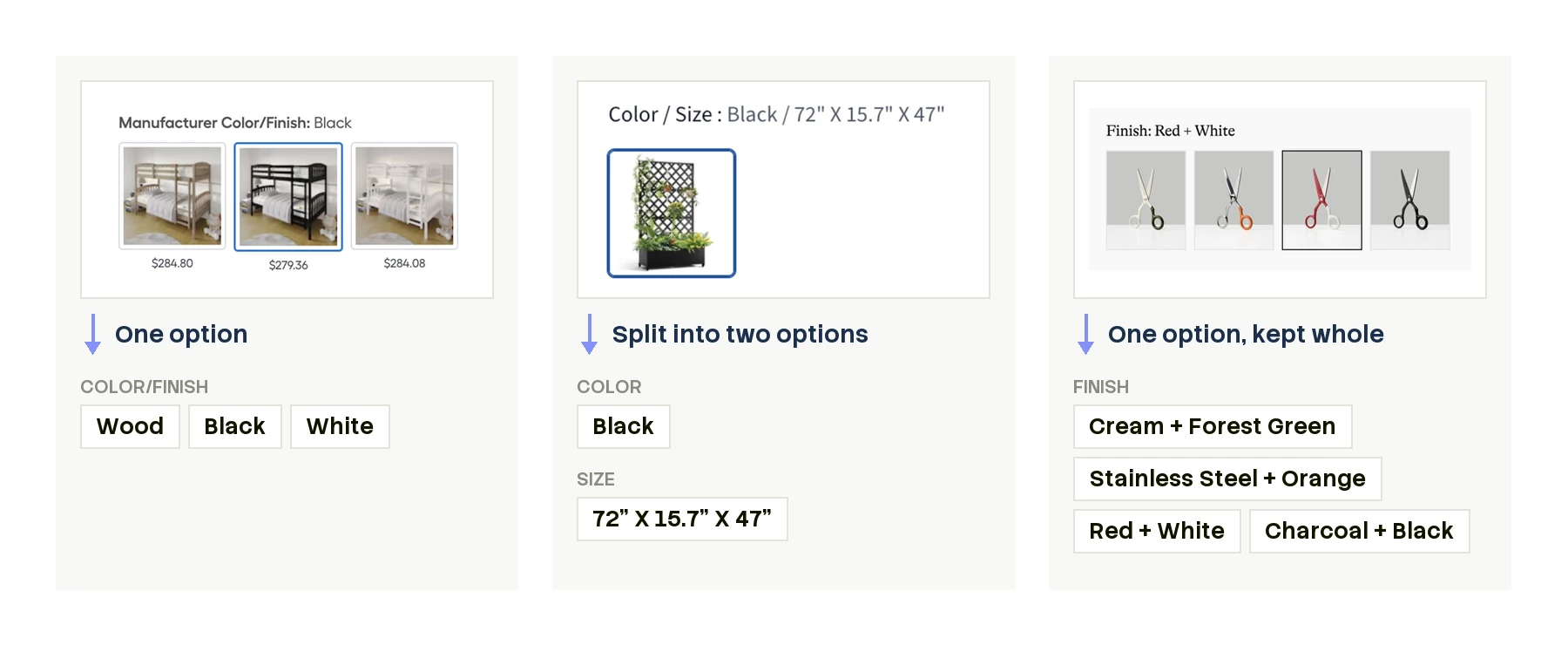
The label is a hint. The values decide.
3. Match every page's buttons to one set
How do we know a button on one page means the same thing as a button on another?
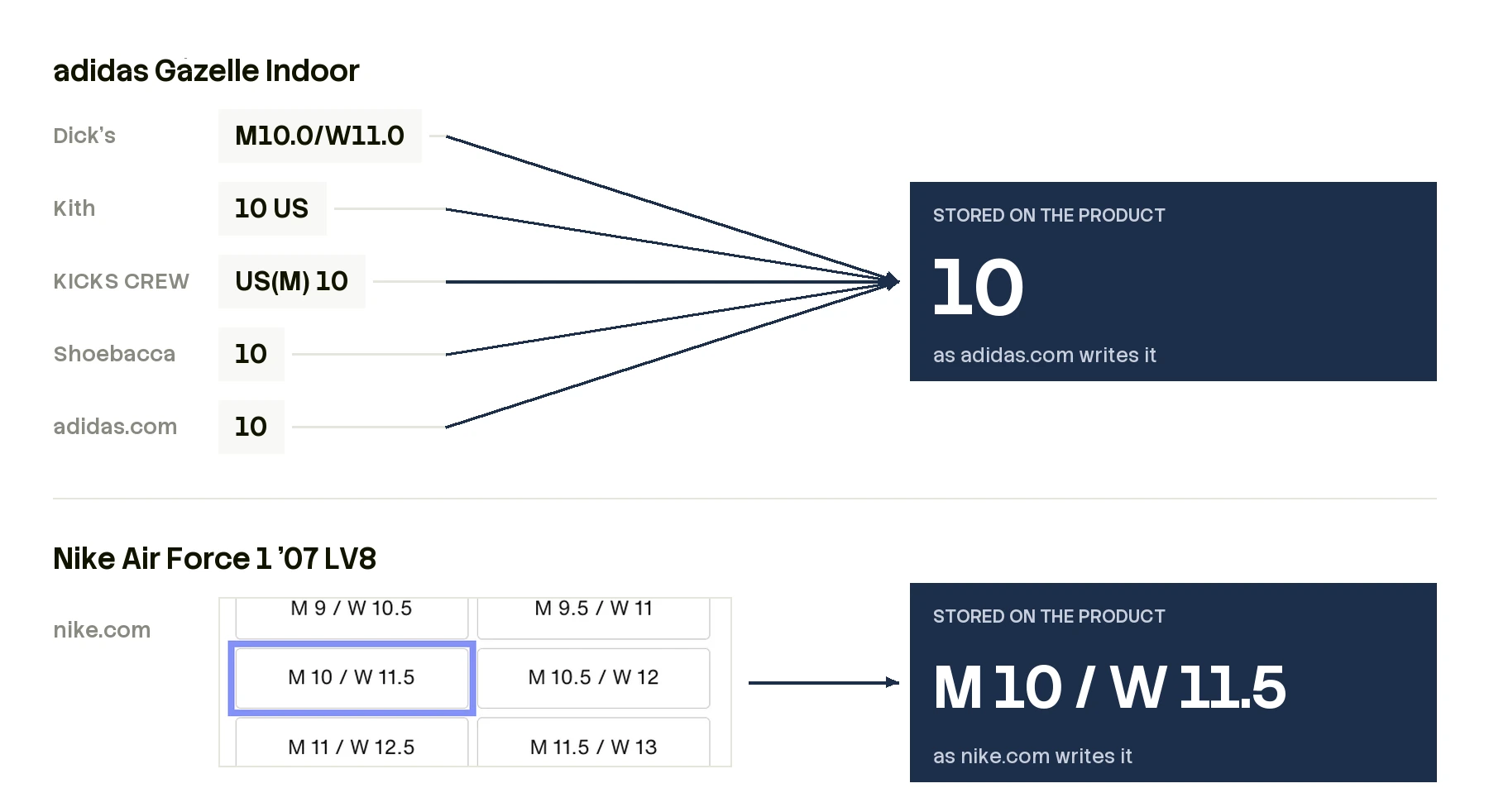
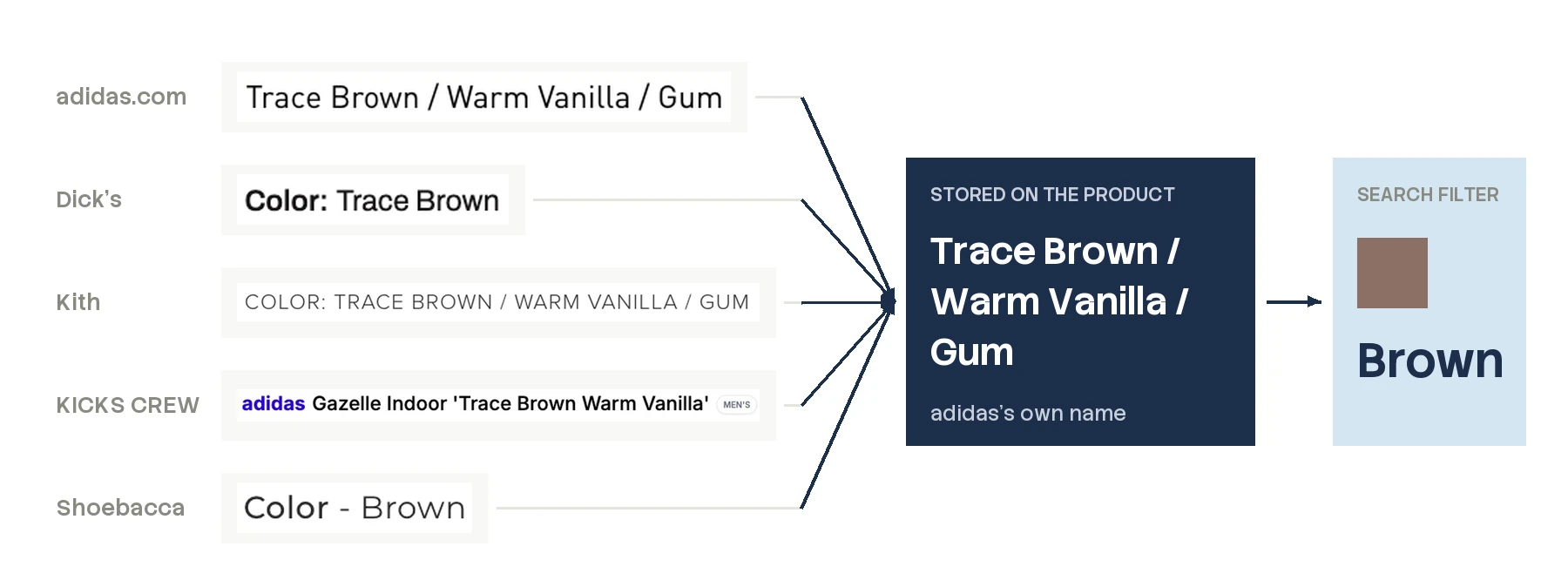
Back to the size buttons. Left alone, one shoe ends up with a size list like “10”, “M10.0/W11.0”, “10 US” and “US(M) 10”, all meaning the same size. Each size should appear once, under one name, so we have to pick whose name to use. We pick the brand's. It's the original, and other stores copy it, often cut short: adidas calls this colorway “Trace Brown / Warm Vanilla / Gum”, while Shoebacca writes just “Brown”, even though the Gazelle Indoor comes in more than one shade of brown.
Sizes also change by country. Maison Margiela makes its shoes in Italian sizes, like a 37. Its US store converts them, so the 37 becomes a 7. Retailers keep the Italian size but write it their own way: “IT 37” at SSENSE, just “37” at Farfetch. Three labels, one size. We read each label in its own system, line them up on a size chart, and show one button: US 7 (EU 37).
Furniture adds units. One store lists a rug at 5 by 8 feet; another lists it at 152 by 244 cm. They look nothing alike, but they're the same size. So we turn every size into numbers with units, and convert them all to one unit before we compare.
4. Map every value onto a shared vocabulary
How does one search find every brand's version of “small” or “brown”?
Using each brand's words keeps each product consistent, but it doesn't make the catalog searchable: every brand still has its own words. Nike writes S, Under Armour writes SM, and a shopper who asks for “small” should see both. An agent shouldn't have to search for “S”, “SM”, “Small” and every other spelling. It should pass one value, once.
Now add a second brand. Say the shopper wanting a brown men's 10 would be just as happy with Nike's Air Force 1 '07 Suede. adidas writes that size as 10; Nike writes it as M 10 / W 11.5. Inside each product, we keep the brand's spelling. On top of that, we map each value onto one short, fixed list for its category. On that list, both sizes are simply 10.
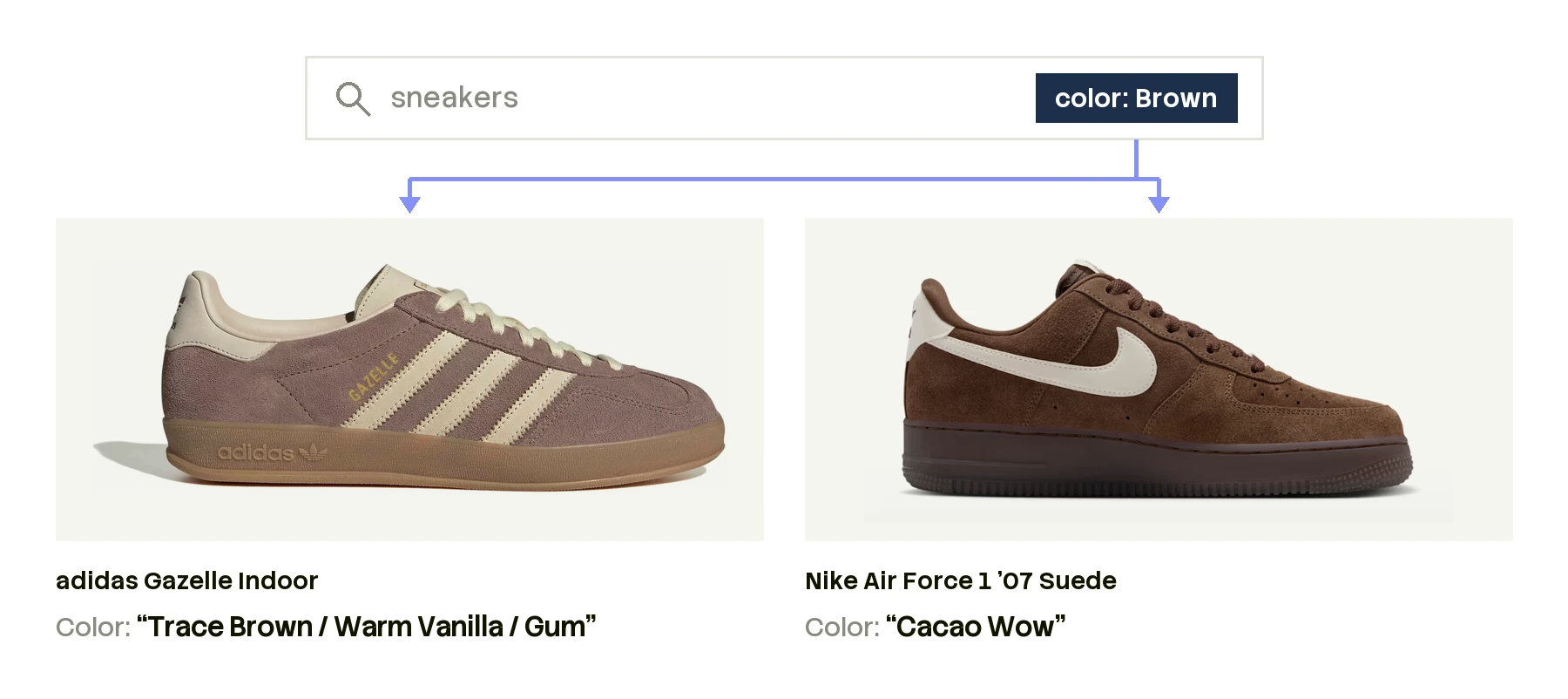
Color works the same way. adidas calls its brown “Trace Brown / Warm Vanilla / Gum”; Nike calls its brown “Cacao Wow”. Our color list is short, so each name has to map to one entry, and both become Brown. Nothing in “Cacao Wow” says brown, so that's a judgment call, not a lookup.
So one value has three versions. The page shows the store's spelling, like Dick's M10.0/W11.0. We store the brand's spelling, like adidas's 10 or Nike's “Cacao Wow”. Both are strings: free text that can say anything, so neither can be filtered reliably. Search filters on the third version, an enum: one entry from a fixed list, and nothing outside it.
Each category publishes its lists, and anyone can read them. Ask our API for sneakers and it returns every attribute the category defines, along with its allowed values:
{
  "slug": "sneakers",
  "attributes": [
    { "slug": "color", "name": "Color", "values": ["Beige", "Black", "Blue", "Bronze", "Brown", "..."] },
    { "slug": "shoe-size", "name": "Shoe size", "values": ["...", "9.5", "10", "10.5", "..."] }
  ]
}
Color has 19 entries, from Beige to Yellow, and shoe size runs in half sizes from 0 up. Turning a string into one of those entries is what lets search filter on it, because an enum can be matched exactly. Not every value has a place on lists this short, but most do: over 90% of values for apparel, over 95% for shoes and over 75% for furniture.
| What the page says (string) | What we store (string) | What search filters on (enum) |
|---|---|---|
| adidas Gazelle Indoor at Dick's: M10.0/W11.0 | 10 | 10 |
| The same shoe at adidas.com: Trace Brown / Warm Vanilla / Gum | Trace Brown / Warm Vanilla / Gum | Brown |
| Nike Air Force 1 '07 LV8 at nike.com: M 10 / W 11.5 | M 10 / W 11.5 | 10 |
| Nike Air Force 1 '07 Suede at nike.com: Cacao Wow | Cacao Wow | Brown |
| Under Armour HeatGear Elite shorts at Dick's: S | SM | Small (S) |
Nobody needs to know that Nike calls its brown “Cacao Wow” to find it. But once you open the shoe, that's the name you see, because it's what Nike printed. “Brown” is for finding the shoe; Nike's name is for buying it.
Why this matters
For an AI agent, this work decides whether it can actually buy something or only vaguely point at it. To place an order, an agent has to name one listing: this store, this shoe, this color, this size, in stock. When every store's values map onto the same lists, “a brown men's 10” isn't a guess. It's a category and three fields:
{
  "query": "adidas Gazelle Indoor",
  "filters": {
    "category_ids": ["sneakers"],
    "gender": "male",
    "attributes": { "color": ["Brown"], "shoe-size": ["10"] }
  }
}
What comes back is the brown Gazelle Indoor in a men's 10 at every store that has it, each with its price and stock. The agent picks one and checks out.
It also decides how fast and how complete the answer is. Web search was built for people: it ranks pages so a person can read the first few and decide. An agent using it inherits that shape. It sees the handful of pages that rank highest, not every store that sells the shoe, so the cheapest pair in a 10 can sit on a store that never makes the first page. And each page it does open has to be read the way a person reads it, clicking through colors and sizes, with a model call for every click and answers that can change from one run to the next.
Structured data turns that around. When every listing is described in the same fields, an agent doesn't pick a few pages to trust. It asks one question of every listing at once, compares them exactly, and gets the same answer every time it asks.
What we've learned
We didn't start with these rules. We wrote each one after running into pages that broke the last: an option whose label meant nothing, a color hiding in the size list, two pages that were obviously one product with nothing on either to say so. We don't get every page right yet, and new kinds of pages arrive every week.
The web was built for people to read, one page at a time. We are building the catalog agents need instead: a universal product catalog made directly for agents, where every product is described once, the same way, with every store that sells it attached. If you're building an agent that needs to find and buy the right thing, start building with us.
Newsletter
Get new posts in your inbox
Field notes from the rapidly changing world of AI commerce